Understanding Errors in the FindingFive Study Grammar
Written by Noah Nelson
Noah Nelson is VP of Product and has volunteered at FindingFive since 2017. He has a PhD in Linguistics from the University of Arizona.
Errors are an inevitable part of writing any computer code, even the relatively simple JSON-based code of the FindingFive Study Grammar. This tutorial aims to provide a foundation for understanding what types of errors you may encounter, how and why they occur, and what to do about them.
Thinking Like a Machine
One of the hardest things for new programmers to learn is how to “think like a machine”. This involves both algorithmic thinking, or breaking down a task into a series of smaller steps, as well as programmatic thinking, or thinking in terms of things like symbolic representation, logical operations, and iterative processes.
But it also involves an almost neurotic obsession with properly structuring and formatting your code. This is because, while human brains are relatively good at understanding intent, computer programs are not. A stray comma or quotation mark in written natural language is no big deal, but it will confound a computer program and likely cause it to fail.
From Study Grammar Code to a Rendered Experiment
In order to produce an experiment that participants can join online, you need to translate your experimental design intentions into Study Grammar code, which FindingFive converts into a runtime of trials to be displayed to participants in a browser. So, how does this happen?
First, the code you write is parsed. Parsing refers to the process whereby your code is broken down into its constituent parts and interpreted by the software, which we will often refer to as the code parser in this context.
Parsing happens at two levels. First, your code is parsed in real time as you type by a JSON parser. This parser checks that the code you are writing is syntactically well-formed JSON code. If it detects any issues, such as a missing colon or unclosed bracket, an error indicator appears to the left of the line of code where the issue was detected.

A JSON syntax error detected in real time, as indicated by the x icon. In this case, the block sequence list is filled with an unquoted string.
Next, your code is parsed by the Study Grammar parser when you preview your experiment or attempt to launch a session. This parser provides further JSON validation as well as checking that your code complies with the requirements of the Study Grammar as outlined in the Study Grammar reference. During this process, the parser uses the instructions in your code to generate an Experiment Specification Format (ESF) file, which includes a runtime of trials representing the full experiment from start to finish.
Errors arise when the parser encounters issues in reading your code or generating the ESF file. For this reason, they are called ESF errors, and they cover things like malformed JSON code, unrecognized references, missing required properties, etc.

An example ESF error message.
After parsing, the code must be rendered to participants. This is the process by which the individual trials of the experiment runtime are converted into HTML, CSS, and JavaScript code (the building blocks of web applications) and presented to participants by the renderer. Although errors can happen here in theory, they are much less common and much more difficult to detect, so we will not discuss them in this tutorial.
Avoiding Errors
How to avoid JSON errors
JSON errors are mostly about understanding the rules of JSON syntax. They are most easily avoided by writing clear, legible code and conforming to standard formatting guidelines. You can find our suggested formatting guidelines for JSON in our JSON tutorial, but feel free to find conventions that work for you or your lab—Just make sure your conventions still conform to the rules of JSON syntax.
How to avoid ESF errors
ESF errors are most easily avoided by understanding the FindingFive objects and their properties as described in the Study Grammar reference. This is your go-to reference for what types of objects and properties the Study Grammar recognizes, their possible values, and what the resulting behavior will be for your experiment.
To help avoid errors arising from typos in object names, we strongly recommend making use of the study editor’s autocompletion feature. This feature suggests the names of appropriate existing objects as values for certain properties. For example, when defining a value for a trial template’s "stimuli" property, the editor will suggest the names of existing stimulus objects as you type. You can use the arrow keys to choose among the options and hit TAB or ENTER to select your choice (or use a mouse, touchpad, or touchscreen).
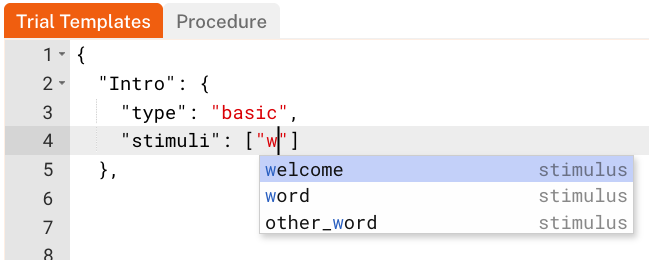
The FindingFive study editor uses a context-aware system to suggest object names as you type.
In some cases, errors can arise from setting incompatible values across different properties. To help avoid these errors, it may be helpful to avoid relying on default by omission, the process by which the Study Grammar implicitly applies default values to properties not explicitly defined by the researcher. To do this, you must explicitly define all possible properties for a given object except those that have no default value. This forces you to pay attention to all object properties and the behavior that results from their values. This may help you to identify places where a particular combination of property-value pairs leads to errors or unintended behavior.
Finally, never underestimate the power of legibility when writing code. Code is generally more legible when it uses ample whitespace and consistent formatting. This includes following guidelines for formatting JSON as well as “the 5 C’s” found in our Study Grammar tutorial.
Understanding ESF Error Messages
Now that you understand a bit about what ESF errors are, let’s look at how they are presented to you. Each ESF error includes a message. Typically, the message will have the following information:
- A code specific to the error type. All error codes are displayed within square brackets and begin with
ESF-followed by a 3-digit numeric code. - A name specific to the error type. Each type of error has a unique name to go along with its unique error code that helps you to identify the type of error.
- A description of the specific error. The description provides as much information as possible to help identify and resolve the error, typically including the specific context in which the error occurred.

A: The ESF error code. B: The ESF error name. C: A description of the error, including the context where it occurred.
Understanding the error code and name
Although each specific instance of an error may be different, errors nonetheless can be organized into different types. Each error type has a unique name and identifier code. For example, [ESF-101] Missing Property Error is an error raised by the parser any time a FindingFive object (i.e., stimulus, response, trial template, block, or procedure) does not include a required property (e.g., "type").
As you can see, the name already tells you a lot about the error. The code also makes it easy to quickly look up the error in our ESF Error Cheatsheet, which is organized by ESF error code.
Categories of ESF Errors
There are actually several categories of ESF error type, each signaled by the first digit of its 3-digit numeric code:
ESF-1xx: Property-related errors, such as missing required properties or invalid property values.
ESF-2xx: Data validation errors, such as missing values or incorrect data types (e.g., list instead of dictionary).
ESF-3xx: Reference and definition errors, such as an undefined stimulus or two responses with the same name.
ESF-4xx: Configuration errors, such as unrecognized randomization patterns or contradictory property-value settings.
ESF-5xx: Inheritance and structure errors, such as issues with object inheritance or other structural errors.
ESF-6xx: Branching errors, which are issues specific to conditional branching.
ESF-7xx: Block-level errors, such as generating a block with too many trials or with incompatible trial templates.
Understanding the error description
The error description is dependent on both the error type and the context in which it was triggered. That context generally signals the FindingFive object that contains the problematic code. For example, in [ESF-101] MissingPropertyError: The property "type" is required but not defined for "procedure"., the context is the "type" property of the procedure section of the study editor.
The description can provide additional information beyond the context as well, including suggestions for how to resolve the error. For example, the error message pictured below offers advice on the possible source of the error, instructing you to check for mistakes in the spelling or capitalization of the stimulus name. In this case, the name "text_stim" does not exist (the real name is "text_stim1").

An ESF-301 Undefined Reference Error message includes a suggestion to check for spelling or capitalization mistakes.
How to Fix Errors
How to fix JSON errors
As noted above, your code is parsed in real time by a JSON parser. This parser does not present explicit error messages as is the case with ESF errors. Instead, it displays a red square icon containing a white x to the left of the first line of code in which it detects a JSON syntax error.
A JSON syntax error detected in real time, as indicated by the x icon. In this case, the block sequence list is filled with an unquoted string.
When you encounter such a JSON error, here are some things to look out for:
- Missing or misplaced quotation marks (
"): check for the proper use of double quotes (single quotes are not supported in JSON). All opened quotes must also be closed. Ensure all object names, property names, and string values are enclosed in double quotes, and that all numeric, boolean, and null values are written without any quotes. - Missing or misplaced brackets (
[]) or braces ({}): check for the proper use of brackets for lists and braces for objects and dictionaries. All opened brackets or braces must be closed. - Missing or misplaced commas (
,): check for the proper use of commas to separate items in a series (i.e., items in a list or property-value pairs in an object or dictionary). Remember that a comma must be placed between each item, but never immediately before the closing bracket or brace. - Missing or misplaced colons (
:): check for the proper use of a colon to separate property names from their values and object names from their definitions (in the case of trial templates and blocks).
If you still cannot identify the source of your error, you may find it helpful to use a dedicated JSON validator (e.g., jsonlint.com). Just be aware that comments are not compatible with standard JSON (they are an added feature unique to the FindingFive Study Grammar). Make sure to remove such features before you attempt to validate using a third party platform.
How to fix ESF errors
Here are some guidelines to help you get started tackling your ESF errors:
First, try to solve the error yourself based on the information provided. Struggling through this process a few times can provide invaluable learning experience, so don’t cheat yourself! Here are some tips for how to do it:
- Identify the error type as indicated by the name provided in the error message. This gives you insight into the kind of error you are dealing with.
- Identify the context of the error as indicated in the error message. Is a particular object identified? Are any particular properties called out? Locate the context in your code. If the context is unclear or none is provided, follow the steps below to narrow in on the error context.
- Look for additional clues in the error description. What is the parser trying to tell you about this issue? Does it identify possible solutions?
- Consider your code in the indicated context carefully. If the message identifies an object or property as missing, but you see it in your code, check for typos. If it signals incompatible settings, did you use the wrong value for a property?
- Check the Study Grammar reference for the specific objects and properties you are using in your code around the context of the error. Make sure you fully understand what each property means, and what values are accepted for that property.
If you’re still unsure, look your error up in our ESF Error Cheatsheet using the error code provided in the error message. This may have additional information about the potential source and causes of the error.
If you still can’t resolve the error, check out our Researcher Forum. It may be that someone has already asked about your issue and gotten an answer there. And if not, post a question there yourself and someone from our community will gladly answer!
Identifying the source of an error when no context is provided
In general, the description of any ESF error will provide at least some information about the context in which the error occurred, such as the type and name of a FindingFive object. However, if this information is missing or inadequate for any reason, there are some steps you can take to help you identify the context for yourself:
- Preview one block of your experiment at a time using our single block preview feature. If the error in question is not raised, you know the source of the error is not in the previewed block. Continue until you have identified the problematic block.
- Preview one trial template from that block at a time by commenting out other trial templates. Again, if the error is not raised, you know the source of the error is not in the previewed trial template. Continue until you have identified the problematic trial template.
- Preview one trial from that template at a time by commenting out other trials. Remember that trials are primarily determined by the
”stimuli”property of a trial template, where each item in the list value for that property belongs to a different trial. But trials are also determined in part by the combination of the”responses”and”response_pairing”properties, so you may need to comment out or change values for multiple properties in order to identify a single trial. Again, if the error is not raised, you know the source is not in the previewed trial. Continue until you have identified the problematic trial. - Exclude stimuli and/or responses from the identified trial by commenting them out from the trial template. Remember that a trial must have either a stimulus or a response, but it need not have both. If you have multiple stimuli or responses on a given trial, you can further identify which of those stimuli or responses is responsible for the error. Again, if the error is not raised, you know the source is not in the included objects. Continue until you have identified the problematic stimulus or response.
These steps can help you narrow down the context as much as is needed to identify the error. Depending on the error’s source, you may stop at any point in this process. For example, some errors are actually due to issues at the block level, and so it would be appropriate to stop after step one, while others may occur at the stimulus level and require you to continue all the way through step 4. Over time, you will get better at interpreting the error messages you receive and engaging this process to locate and fix your errors.
Conclusion
This concludes this tutorial on Understanding Errors in the FindingFive Study Grammar. Looking for more detailed help debugging a particular error? Check out the ESF Error Cheatsheet!