Understanding JavaScript Object Notation (JSON)
Written by Noah Nelson
Noah Nelson is VP of Product and has volunteered at FindingFive since 2017. He has a PhD in Linguistics from the University of Arizona.
Experiments in FindingFive are built using the FindingFive Study Grammar, which is based on JavaScript Object Notation (JSON). Previous experience with JSON is absolutely not necessary for setting up your studies. If you've never heard of JSON, that's okay! Keep reading to learn the basics.
A note about terminology
Different coding languages use different terms for similar concepts. A reader familiar with JSON may notice that we do not always use formal JSON terminology, but we do try to be consistent in our use of terms nonetheless.
JSON Objects
At the core of JSON is the object. Objects in FindingFive include things like stimuli, responses, and blocks. Each object has a set of attributes that define it. For example, a stimulus object minimally has a "type" attribute (for example, "text" or "image"), and a "content" attribute (the text or image file to be displayed). It may have other attributes as well, such as the size or color of the text to display or how long it should be displayed for.
JSON objects are indicated by curly braces {}. Within those curly braces, we define the object's attributes. Here is an example JSON object, in this case a FindingFive text stimulus:
Object, or dictionary?
Some of the more capable programmers among you may notice that this is exactly like a dictionary. What is known as an object in JSON is in fact known as a dictionary in some other languages, such as Python. We choose to call higher level JSON structures "objects", and reserve the term "dictionary" for special use cases discussed below.
Object Names
Though not a necessary feature of JSON in general, objects in FindingFive must be given a unique name. This name is chosen by you, and allows you to reference objects throughout your experiment. For example, our text stimulus example above might therefore look like this:
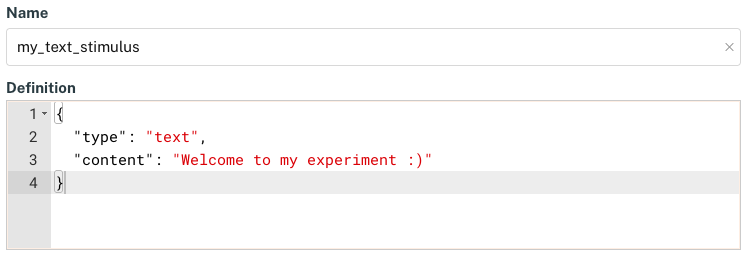
FindingFive objects include both a name and a definition.
Differing formats, same logic
When defining stimuli and responses, the name field sets the object name, and the definition field defines the object's attributes. In other cases, this takes the form "name": {<definition>}, with the name in double quotes followed by a colon and then the definition of object attributes in curly braces. This is covered in more detail in the Introduction to the FindingFive Study Grammar tutorial.
We cover FindingFive objects in more detail in our Introduction to the FindingFive Study Grammar tutorial.
Property-Value Pairs
The attributes of a JSON object are defined using property-value pairs (a.k.a., key-value pairs). In a poperty-value pair, the property refers to an attribute of the object, and the value gives a specific value to that attribute. In our text stimulus example, the poperty "type" has the value "text" and the property "content" has the value "Welcome to my experiment :)". As noted above, additional properties—like size and duration—could also be defined with their own values.
Each property-value pair takes the format "property": value, where the property is always placed in double quotes and followed by a colon, and the value comes after the colon and takes whatever format is required (more on data types and formatting later).
You can alter the behavior of a FindingFive experiment by changing the value of a specific property of an object. For example, in the property-value pair "duration": 5, the property is "duration" and the value is 5 (the number of seconds to display the stimulus for). Setting this to "duration": 10 would change the display duration to 10 seconds.
Types of Values
The values assigned to properties of JSON objects must belong to one of 6 data types. These can be divided into "simple" data types, which represent a single value, and "complex" data types, which represent a composite of multiple values.
Simple Data Types
Number
A number is just what you think it is. Numbers in JSON can take the form of integers or decimals (a.k.a. floating point numbers) and they can be positive, negative, or zero. They are not enclosed in quotes.
Boolean
A boolean is a data type that has two possible values: true or false. In JSON, boolean values are not enclosed in quotes and must be written in lowercase. Booleans are useful for properties that represent an on/off toggle—should this property be engaged, or disengaged?
Null
Null is a special data type that effectively says a property has no value. It is used only rarely in the FindingFive Study Grammar.
String
A string is a sequence of characters, such as letters, numbers, spaces, hyphens, etc. Double quotes signal the beginning and end of each string. Anything that appears within double quotes in JSON is a string, and any simple data type that is not a number, boolean, or null must be represented as a quoted string.
Complex Data Types
List
A list represents an ordered sequence of values. Lists are indicated by square brackets []. Within those brackets, each list item is separated by a comma, with no comma following the final item. List items can be any data type. Note that the order in which you place the list items matters and will be preserved.
Dictionary
Like an object, a dictionary is a collection of property-value pairs indicated by curly braces {}. At FindingFive, we choose to distinguish between objects—which are high-level entities of your experiment such as stimuli and responses that require a unique name—and dictionaries, which are lower-level collections of property-value pairs that do not get a name and are used as the value of a given property.
Like lists, each property-value pair in a dictionary is separated by a comma, with no comma following the final property-value pair. Properties in a dictionary must always be strings, but their values can be any JSON data type.
Unlike lists, dictionaries are not ordered. That is, the order in which you list the property-value pairs of a dictionary does not matter and may not be preserved. This is because each property acts like a unique key that can be used to look up its corresponding value. This means that it is important to define each property in a dictionary only once, and that each property must have a unique label.
Nesting Complex Data Types
It is possible to nest complex data types within one another. For example, a list can take another list or a dictionary as one of its items:
Likewise, a dictionary can take another dictionary or a list as the value in one of its property-value pairs:
"property": {
    "prop1": {"p1": 1, "p2": 2},
    "prop2": [1, 2]
}
This nesting can (at least theoretically) go to an arbitrary depth.
JSON Formatting
Just like when you write in natural language, there are certain rules governing the structure and organization of JSON code that you must follow. We provide an overview of these rules here.
Special Characters
In JSON, there are several special characters that are reserved for syntactic purposes. These characters can only be used for these specific purposes, or else as characters inside a string. For our purposes in the FindingFive Study Grammar, there are 6 such characters:
- The colon (
:) is used to separate a property from its value. - The comma (
,) is used to separate items in a series, such as a list of values or a dictionary of property-value pairs. The last item in a series must not be followed by a comma. - Square brackets (
[]) are used to delineate the beginning and end of a list. - Curly braces (
{}) are used to dilineate the beginning and end of an object or dictionary. - Double quotes (
"") are used to dilineate the beginning and end of a string. - The single backslash (
\) is an escape character used to allow double quotes inside a string. For example, the string"This is a \"string\" with double quotes inside it."would be rendered in an experiment asThis is a "string" with double quotes inside it.
Whitespace
Unlike Python—but like many other languages—whitespace is not consequential in JSON. This means that spaces, indentation, and line breaks are not meaningful in JSON code. The use of whitespace to structure and organize your code is therefore a matter of style and preference. However, we encourage you to adopt certain habits to help make your code more readable:
- Keep lines short. A standard recommendation is 80 characters or fewer.
- Keep indentation consistent. Either 2 or 4 spaces per level of indentation is standard, but be consistent with which you use. Opening and closing brackets should always appear at the same level of indentation.
- Use spaces consistently. We recommend a single space after each colon and comma.
- Consider breaking up longer lists or dictionaries across multiple lines. If you do, put your line breaks after the opening bracket or brace, after commas, and immediately before the closing bracket or brace.
Here is an example of a JSON object using all 6 data types that follows our formatting recommendations:
Note how:
- we kept each line under 80 character (the longest line, number 9, is 39 characters, including spaces),
- we indented consistently, using 4 spaces per level of indentation,
- we placed a single space after each colon and comma on a given line,
- and we broke up the object definition (a dictionary) across multiple lines by placing each property-value pair on its own line.
Here is the same object, written without using any of these recommendations. It's functionally identical, but a lot harder to read:
These formatting guidelines make your code more readable for everyone, including yourself. Note that many of these conventions also lead to significantly more lines of code. This can actually be a good thing, especially if you later encounter JSON errors, which typically report a line number. A greater number of shorter lines can reduce the search space for identifying the source of such errors!
Resources for JSON formatting and validation
There are resources available online for automatically formatting and/or validating JSON code (sometimes called "linting") that may prove useful, such as https://jsonlint.com/.
Conclusion
This concludes the tutorial Understanding JavaScript Object Notation (JSON). Continue your learning journey with Introduction to the FindingFive Study Grammar next!