Basic Trial Template
The basic trial template structures each trial by presenting stimuli above responses in a vertical layout. In any trial using this template, responses always appear below stimuli. This design reflects a common and intuitive way of structuring trials in psychological research. Additionally, because both stimuli and responses are optional, the basic trial template allows for considerable flexibility—trials may consist of only stimuli, only responses, or both, depending on the study's needs.
Given the many configurable settings within a trial template, the following sections categorize these properties by function—such as stimulus behavior, timing, and trial progression—to facilitate navigation and conceptual clarity.
Looking for Trial Template Types "instruction" and "AFC"?
These trial templates are now deprecated and should not be used in studies anymore. For existing studies that have these trial template types, simply set the "type" property to "basic". For archived documentation on these template types, check out this page.
type
repeat
- Definition: The number of times to repeat the trials generated by the entire trial template. Each repetition creates the template's stimulus pattern and response distribution independently, so randomization, if used, is performed anew for every repetition.
- Possible values: A positive integer (greater than or equal to
1) - Default:
1 - Note: This repeats the complete trial template, including its stimulus pattern and response distribution. It is different from the block-level
pattern.repeat, which repeats a block's sequence of trial templates.
This generates three independently randomized sets of the four trials. Researchers can use repeat instead of duplicating the trial-template definition when the same condition should be presented multiple times with fresh randomization.
replayable
- Definition: If set to
true, a clickable banner saying “replay this trial” will appear on the top left corner of all trials generated from this trial template. Participants can refresh a trial by clicking that banner. When multiple questions are displayed on a trial, this allows participants who have not yet submitted an answer to the final question to change their responses. - Possible values:
trueorfalse - Default:
false
r1, r2, and r3) and must provide them again.
Stimulus Properties
stimuli
- Definition: A list of items specifying which stimuli to be used in a trial template and how they are used (such as the locations of stimuli and whether multiple stimuli are presented on the same trial).
- Possible values: See the other tabs of this section for details.
- Definition: This option takes a list of stimulus names (e.g.,
["s1", "s2", "s3"]) that define which stimuli to present on each realized instance of this trial template. These stimuli will be presented in standard locations. - Possible values: A list of stimulus names (e.g.,
["s1", "s2", "s3"]). Use nested lists to present multiple stimuli on a single trial (e.g.,["s1", ["s2", "s3"]]). -
Example: For example, consider the trial template
"T1"defined as:This trial template will generate a total of three trials:
s1will be displayed on the first trial,s2ands3will be displayed on the second trial, ands4will be displayed on the third trial. The locations of these stimuli are chosen by FindingFive - when there's one stimulus per trial, the stimulus will be in the center of the trial; when there are more than one stimulus per trial, the stimuli will be placed in intuitive default locations.
- Definition: A list of dictionaries of stimulus names, paired with their locations in a 3x3 grid. Optionally, one can also specify whether to randomly shuffle the stimuli across the defined locations.
- The 3x3 grid is organized as follows:

- Possible values: A list of dictionaries specified in the form:
{"which": [LIST_OF_STIMULI], "location": [LIST_OF_LOCATIONS], "randomize_location": true or false, "copies": N}. Note that "randomize_location" and "copies" are both optional (the default value of "randomize_location" isfalse, and the default value of "copies" is1). Also note that with the custom option, each dictionary refers to stimuli-location pairings for a single trial. Include one dictionary for each desired trial. -
Example: For example, to place two stimuli on a single trial so that one is at the top left corner and the other at the bottom right corner, one can specify:
In the above trial template,
s1ands2will be displayed on the first trial. Becauserandomize_locationis specified astrue,s1ands2will be randomly placed in the top left corner (location1) and bottom right corner (location9).s3ands4will be displayed on the second trial. Becauserandomize_locationis not specified (equivalent to"randomize_location": false),s3will appear in the top left corner (location1) ands4will appear in the top right corner (location3).
Stimulus names can also be a special syntax that refers to participant responses collected on previous trials of the same experiment (carryover responses). This can be useful for experimental designs where the participant is asked to review or judge their own responses in perception or decision making tasks. At the time being, FindingFive supports using participant data collected from text and audio responses as text and audio stimuli, respectively.
The special syntax is:
Each instance of this special stimulus name carries over exactly one participant response. In a typical design, the same ResponseName response may be used many times with different stimuli on the same trial template. To carry over multiple participant responses that can be matched by this special syntax, simply use as many instances of this special stimulus name as needed. For example:
The above trial template will create 5 different trials, each of which uses a different response that has been collected on the AudioRecordingTrial in the TrainingBlock (note you must make sure that that trial has collected at least 5 AudioResponses).
By default, you do not need to define a separate stimulus for carryover responses used as stimuli. However, in the event that customization is necessary, you can create a stimulus of the same name. For example, we can create a stimulus named %r:TrainingBlock|AudioRecordingTrial|AudioResponse after we have used the same syntax in the stimuli property of the above trial template. Then, we would like to make the stimulus invisible and truncated to only 5 seconds (let’s pretend the original audio response collected 10s of recording):
Importantly, as a general rule for using carryover responses, those responses must have been already collected in an earlier block than the block referencing them.
copies
- Definition: The number of independent copies to create for a stimulus entry. Copies are expanded before stimulus patterns are applied. This feature is especially useful for avoiding typing the same stimulus over and over to achieve counterbalancing.
- Possible values: A positive integer (greater than or equal to
1) - Default:
1 - Note: When the stimulus is a response-as-stimulus reference, each copy points to a different collected response (of the response object).
This creates four stimulus instances: three independent instances of practice_item and one instance of test_item. The copies participate in stimulus ordering and response pairing as separate entries.
stimulus_pattern
Definition: A dictionary that specifies how the supplied stimuli are used to generated trials for this template. The dictionary usually consists of a set of optional properties for tweaking the presentation of stimuli on trials generated from a template, such as:
attribute
- Definition: A stimulus can have custom-named properties that serve as attributes of the stimulus. This is useful for controlling the presentation pattern of particular types of stimuli, when used together with some of the below options for
order. - Possible values: A custom-named property defined for one or more of the stimuli listed in the
stimuliproperty of a trial template. - Default: there is no default for this property as it is completely optional. That is, the
"attribute"property can be omitted fromstimulus_pattern.
For example, one can set a custom attribute called "grammatical" with values of either true or false for a group of text stimuli:
and
Then, one can alternate the presentation of grammatical and ungrammatical sentences by using the following stimulus pattern setup:
unique_by
- Definition: Accepts a list of attributes and samples all
stimulisuch that each attribute value occurs only once. This is useful for sampling without repeating, for example sampling items X subjects while ensuring each item and subject occurs only once in your sample. - Possible values: A list of custom-named properties defined for one or more of the stimuli listed in the
stimuliproperty of a trial template. - Default: There is no default (optional, can be ommitted).
- The total number of sampled trials is limited by the smallest custom attribute included in
"unique_by"(e.g., a 2 x 3 x 4 design will yield 2 trials). - The order of attributes in
"unique_by"does not matter. - The
"unique_by"property is applied independently each time a trial template is used. This will lead to different samples each time it is used in combination with some orders (e.g.,"random"). Note that this will apply across participants as well as across multiple instances of the trial template for each participant.
For example, one can set two custom attributes for a group of audio stimuli: (1) "sentence_number", with values of either 1, 2, 3, or 4; and (2) "speaker_number", with values of either 1, 2, 3, or 4:
and
and so on.
Then, one can build a trial template using the entire 4 x 4 superset of 16 stimuli, but randomly sample only 4 of those stimuli such that no sentence or speaker appears more than once:
The result would be 4 trials, randomly selected such that sentences 1-4 each appear only once and speakers 1-4 each appear only once (e.g., "s3-2", "s1-4", "s2-1", "s4-3").
order
- Definition: The order in which stimuli within a trial template are presented on trials generated from this template. When
limitis specified, the order is applied to the requested number of stimuli, rather than being applied to the full set of stimuli and then truncated afterward. - Possible values:
"fixed","random","pseudorandom","ascending","descending","alternate","every". See the following tabs for details on each of these. - Default:
"fixed".
"fixed" presents stimuli in the same order as they are listed in the stimuli property of the trial template. For example:
A total of two trials will be generated from this trial template: the first trial presents the stimulus "s1" and the second trial "s2". In other words, stimuli are presented in the order they are listed in the stimuli property due to the "fixed" order. This is the default and can be omitted.
"random" presents stimuli randomly, using true randomization that is generated each time a participant views the study, with no counterbalancing within or between participants.
In the above code, the presentation order of stimuli "s1" and "s2" is randomized per participant, and per instance of the trial template. For example, if the same trial template is used multiple times in a study, the trials generated from the template will be randomized separately for each occurrence of that trial template for each participant.
"pseudorandom" presents stimuli randomly, subject to the constraint that stimuli with a designated custom attribute (in this example, "ungrammatical") will appear in a row at least "min_N" times (defaults to 1) and at most "max_N" times (defaults to, and is always at least equal to, "min_N"). When limit is specified, the pseudorandom pattern generates exactly that many stimuli while satisfying the randomization constraints. If the requested configuration is infeasible, an error will be shown before the experiment is previewed.
"ungrammatical" set to true) are presented at least twice in a row, but no more than 4 times consecutively.
"ascending" presents stimuli in increasing order by the value of a designated custom attribute (in this example, "length").
Consider that the following stimuli are defined in your study:
The following trial template:
"length" increases (singleShort1, singleShort2, singleShort3, etc.). Intuitively, changing "ascending" to "descending" has the exact opposite effect.
Note that if two or more stimuli have the same value for "length", then their relative order can be randomized setting "pre_shuffle" to true:
"pre_shuffle" has no effect.
"descending" presents stimuli in decreasing order by the value of a designated custom attribute (in this example, "length").
Consider that the following stimuli are defined in your study:
"length" decreases (singleShort5, singleShort4, singleShort3, etc.). Intuitively, changing "descending" to "ascending" has the exact opposite effect.
Note that if two or more stimuli have the same value for "length", then their relative order can be randomized setting "pre_shuffle" to true:
"pre_shuffle" has no effect.
"alternate" presents stimuli so that they alternate between values of a defined custom attribute. When limit is specified, it generates exactly that many stimuli if the requested configuration is possible. See partial_runs for details.
Consider that the following stimuli are defined in your study:
The following trial template then presents the stimuli so that "easy" and "hard" alternate:
"every" presents one stimulus with a defined custom attribute after presenting N-1 stimuli without this attribute. An additional property "N" must also be specified. When limit is specified, the pattern generates exactly that many stimuli, if enough stimuli are available to satisfy the requested distribution.
Consider that the following stimuli are defined in your study:
"N"-1) without custom property "difficult", then presents 1 stimulus with "difficult" : true, and repeats until all stimuli are displayed (e.g., singleShort1, singleShort2, singleShort4, singleShort3, singleShort6, singleShort5).
partial_runs
Suppose the stimuli are defined separately, with three possible values for the condition attribute and uneven group sizes:
The trial template lists the separately defined stimuli by name:
Allowing partial runs produces a sequence that alternates across all three attribute values as far as possible:
Possible output: a1, b1, c1, a2, b2, a3, whose attribute sequence is A B C A B A. The first A B C is a full run; the final A B A are two partial runs because no C stimulus remains.
To require only complete A-B-C cycles, set "partial_runs" to false:
Because the six available stimuli cannot form two complete A-B-C cycles, this configuration raises a stimulus pattern error. However, a requested limit of 3 would make the stimulus pattern possible again by truncating the output to just a single A-B-C cycle.
A sequence such as A B A B A does not count as a partial run in this example. It alternates between the available values, but it never completes the required three-value A-B-C cycle and therefore does not demonstrate a partial run of the pattern.
pre_shuffle
- Definition: Whether or not to randomize the stimulus order as given in the
stimuliproperty of a trial template before applying the specified pattern. - Possible values:
trueorfalse - Default:
false
Consider that the following stimuli are defined in your study:
Consider the effects of "pre_shuffle":
"pre_shuffle" set to false (which can be omitted since it's the default), the stimuli are always going to be presented in the order "singleShort1", "singleShort4", "singleShort2", "singleShort5", "singleShort3"*
"pre_shuffle" set to true, although "easy" and "hard" still alternate, it is possible to obtain a sequence such as "singleShort2", "singleShort5", "singleShort1", "singleShort4", "singleShort3". That is, the order in which stimulus names are listed in the trial template has no effect on the generated alternating order anymore.
N
- Definition: This property is required when
orderis"every", meaning that for every N trials, present one stimulus with the attribute specified in"every"(that is, present one trial with the attribute of interest after every N-1 trials without the attribute). - Possible values: An integer
- Default: there is no default as this property is only required for some types of
"order"and should be omitted in most cases.
Consider that the following stimuli are defined in your study:
"N"-1) without custom property "difficult", then presents 1 stimulus with "difficult" : true, and repeats until all stimuli are displayed (e.g., singleShort1, singleShort2, singleShort4, singleShort3, singleShort6, singleShort5).
limit
- Definition: The target number of stimuli to generate from the trial template. For
alternate,every, andpseudorandom, a pattern is generated to this length rather than being generated in full and truncated afterward. - Possible values: A non-negative integer smaller than or equal to the number of stimuli available after preprocessing, such as
unique_byfiltering. A value of0means no limit. - Default: there is no default as this property is completely optional and can be omitted.
- Note: Negative values are invalid. A pattern raises an error when the requested length cannot satisfy its constraints.
The most common use of "limit" is to randomly sample a subset of stimuli from a given collection:
Response Properties
responses
- Definition: A list of response names representing responses to be used on realized trials.
- Possible values: Single plain text label (e.g.,
["response1"]) or nested list (e.g.,[["response1", "response2"]]). Nested lists can be used to present more than one response in a single realized trial.
r1 for the first trial (which presents s1) and r2 for the second trial (which presents s2).
The above code presents both r1 and r2 for both the trial presenting s1 and the trial presenting s2.
response_pairing
- Definition: When both the
stimuliand theresponseslists contain more than one element,"response_pairing"tells FindingFive how to combine stimuli and responses across trials. - Possible values:
"alternate","partitioned","random". See the following tabs for details on each of these. - Default:
"alternate". - Responses are always evenly distributed among the stimuli - that is, if a trial template contains N times as many stimuli as responses, each response will be associated with exactly N stimuli
- The number of stimuli must be an exact multiple of the number of responses.
- The pattern as specified by
stimulus_patternis applied after response pairing - that is, FindingFive pairs stimuli and responses together according to the specified "response_pairing" first, and then applies the specifiedstimulus_pattern.
"alternate" pairs the first response (r1) with the first stimulus (s1), the second response (r2) with the second stimulus (s2), the third response (r3) with the third stimulus (s3), and so on, until all responses are used, at which point FindingFive goes back to the beginning of the response list and continues to pair the responses with the remaining stimuli in the same pattern.
r1 will be paired with s1 and s4, r2 with s2 and s5, r3 with s3 and s6.
"partitioned" evenly divides the entire list of stimuli into sublists according to the number of responses. For example, if there are 9 stimuli and 3 responses, the stimuli will be partitioned into 3 sublists of 3. Then, preserving the original order of the stimulus list, "partitioned" pairs the first response with the stimuli in the first sublist, the second response with the stimuli in the second sublist, and so on until all responses are used.
r1 will be paired with s1 and s2, r2 with s3 and s4, r3 with s5 and s6.
"random" randomly pairs each response with stimuli. If there are more stimuli than responses, multiple stimuli will be assigned to each response. For example, if there are 9 stimuli and 3 responses, FindingFive will create 9 trials for which each response is randomly paired with 3 stimuli, without overlap.
r1 might be paired with s4 and s5, r2 with s2 and s6, r3 with s1 and s3.
follow_up_responses
- Definition: One or more responses to conditionally display depending on how a participant has responded to a previous question (defined in the
responsesof this trial template). - Possible values: Dictionary including the name of the previous response, the values of this response to match, and the name of the follow-up response. Multiple follow-up conditions can be used (see example).
"follow_up_response1" if the participant chooses either value1 or value2 in the "previous_choice_response" (which must be defined in responses of this trial template), and display two other different responses if the participant chooses value3 instead.
response_confirm
- Definition: If set to true, participants will need to explicitly confirm their responses before proceeding to the next trial. Default (or omission) is false, in which case the study will proceed to the next trial immediately after all responses on the current trial have been recorded.
- Possible values:
trueorfalse - Default:
false
Timing Properties
delay
- Definition: Delay the onset of a trial. This is particularly useful for implementing an inter-trial interval.
- Possible values: A number of seconds (fractions are supported)
duration
- Definition: The amount of time to wait before automatically proceeding to the next trial. This is useful in cases where no responses are needed (such as during a training phase). This feature should not be used on trials where participant responses are needed. To turn off automatic advancement to the next trial, see
auto_advance. - Possible values: A number of seconds (fractions are supported)
countdown_visible
- Definition: If set to
trueanddurationis greater than0, then a timer will appear on each trial to remind participants explicitly that this is a timed trial. - Possible values:
trueorfalse - Default:
false
Trial Progression Properties
auto_advance
- Definition: If set to
true, participants will automatically advance to the next trial when stimuli with barrier finish on the current trial. When set tofalse, a continue button will appear for participants to click on to advance to the next trial. - Possible values:
trueorfalse - Default: When
durationis longer than0, the default istrue; otherwise,false.
duration is not specified, "auto_advance" will be set to false. Participants will be required to click a continue button to advance to the next trial.
continue_button
- Definition: Whether or not a continue button is displayed and when it appears. By default, FindingFive automatically determines if a trial will have a continue button and when that continue button appears, which should produce the desired behavior for most cases.
- Possible values: see the
displayandonsetsub-properties below.
display
- Definition: Whether to always display the continue button or to allow FindingFive to automatically determine if it is displayed.
- Possible values:
"auto"or"always" - Default:
"auto"
onset
- Definition: Whether to display the continue button from the beginning of the trial or to allow FindingFive to automatically determine when it is displayed.
- Possible values:
"auto"or"immediate" - Default:
"auto"
text
- Definition: Custom text to display on the continue button. If not specified, the button displays default text.
- Possible values: A string of 50 characters or less
- Default (by omission): "Continue" (may be translated to other languages depending on the user's browser setting)
Data Properties
submission_point
- Definition: If set to
false, then data collected on trials generated from this template will not be submitted to the server right away. Instead, it will be cached and wait to be submitted until the next trial that has this property set totrue. Setting this property tofalseis recommended for reaction-time-critical trials to avoid network latencies. - Possible values:
trueorfalse - Default:
true, meaning that data collected on a trial will be submitted at the end of the trial by default.
meta_columns
- Definition: User-defined column names and values to appear in the
results.csvdata output file for all trials generated by this template. This is useful for adding customized trial-level meta data to your output file for analysis. - Possible values: Must be a dictionary of user-defined key-value pairs. The keys are column names, and must be strings. The values can be numbers, strings, booleans (
trueorfalse), ornull. - Note: All meta column names will automatically receive a
"meta_"prefix in the data output file.
Imagine a within-subjects manipulation where half the trials are controls and half are tests. You might do this using two trial templates, one for each condition. To simplify analysis, you can add a custom meta column to the data results called "condition" and give it a different value for each trial template:
After running a study session and downloading the data, here is how your results.csv file might look (some columns have been hidden for illustrative purposes):
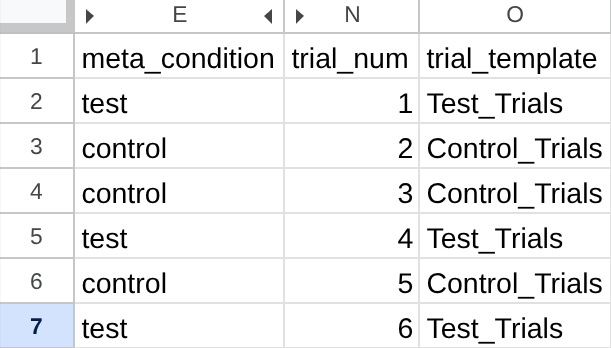
A single custom meta column, "meta_condition", with different values from each trial template.
Astute observers will notice that we could simply use the trial template names to identify control and test trials in this example. With more complex setups, however, this quickly becomes unwieldy. Meta columns provide maximum researcher control, and can make this much simpler.
Display Properties
vertical_center
- Definition: If set to
false, stimuli and responses on this trial will be displayed from the very top of the screen; normally, FindingFive vertically centers all content. - Possible values:
trueorfalse - Default:
true
color_scheme
- Definition: Sets the color scheme for trials generated by this template. If set to
light(default), the background will be white and the default foreground color will be black. If set todark, the background will be black and the default foreground color will be white. Notice that text stimuli you create, as well as the default hints and instructions, will change color according to the scheme. - Possible values:
lightordark - Default:
light
reserve_locations
- Definition: Whether to reserve screen space for stimuli and responses that are not yet visible on a trial. When set to
true(the default), hidden elements occupy their intended positions, preventing layout shifts as elements appear. When set tofalse, hidden elements are removed from the layout entirely, so visible elements will be displayed to the participant as if they were the only element on this trial. - Possible values:
trueorfalse - Default:
true
r1, if it has a delay property, will not take up any space until it becomes visible, allowing s1 to occupy center of the screen as if it were the only element on the trial. After response r1 appears, the location of s1 will shift slightly upward to accomodate the newly displayed response.